A column for each digit
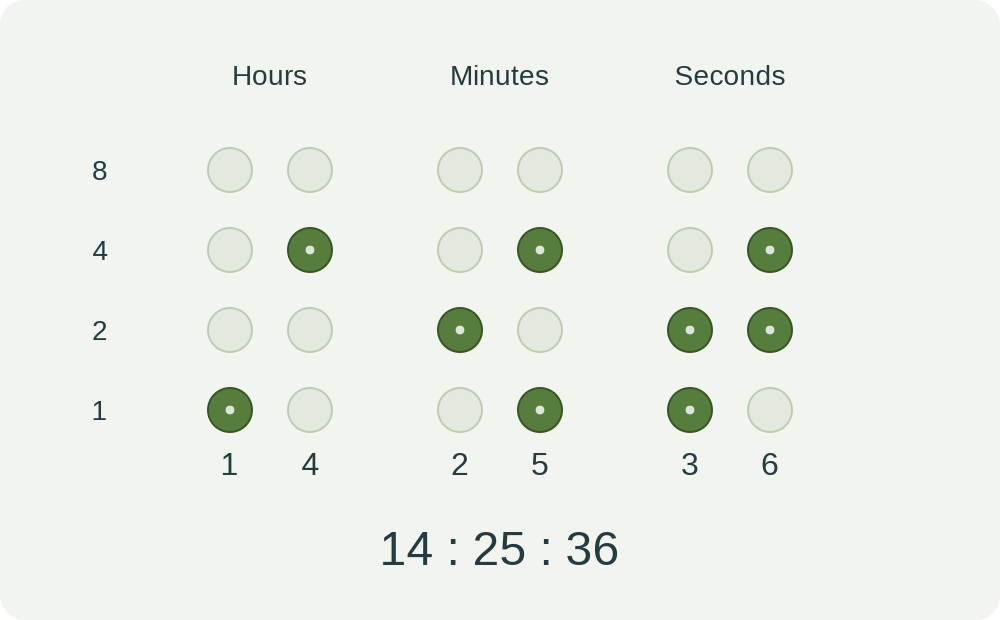
Our binary clock uses BCD, short for Binary Coded Decimal. Rather than converting the entire hour value into one binary number, each decimal digit gets its own column. Two columns belong to hours, two to minutes and two to seconds.
Just add the glowing dots
From bottom to top, the four dots have values 1, 2, 4 and 8. Only glowing dots count. If 4 and 1 light up, the digit is 5; 4 and 2 make 6. The diagram therefore reads 1, 4, 2, 5, 3 and 6: 14:25:36. An unlit column means 0.
On its own or with a reading aid
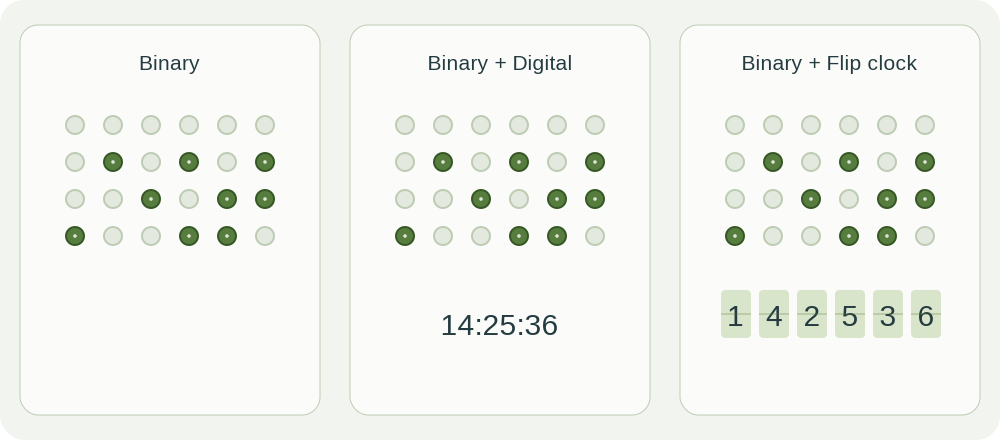
Under Appearance, choose Binary, Binary + Digital or Binary + Flip clock. The extra time display sits directly below the dots. It is a useful way to learn: decode the pattern first, then compare it with the digits. Later, simply leave out the reading aid.
Your time, your colour scheme
Active dots glow in your selected colour scheme. Without seconds there are four columns instead of six; hide the weights at the side with Show numerals. Your selected time zone and 12-/24-hour format apply here too. In phone landscape focus view, the binary clock sits on the left and the calendar on the right. Like the other time views, it uses your device time.