MUSIC & RHYTHM · GUIDE
Hear the pulse. See the whole bar.
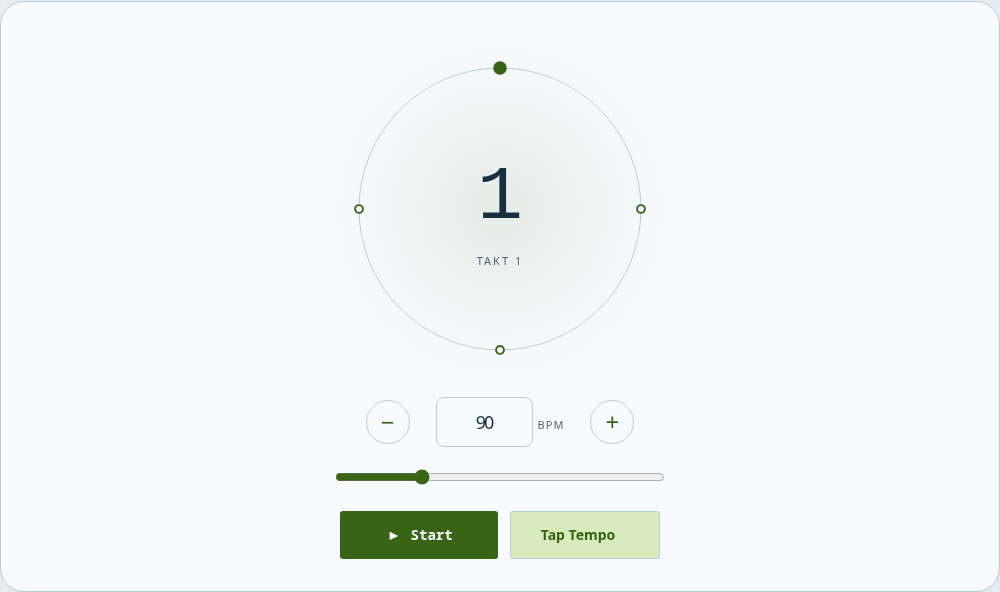
The Jacktools metronome combines audible beats with four visual displays. Set the tempo, bar accents and subdivisions, and practise with silent bars. The tool needs neither a microphone nor a recording of your playing.
Open MetronomeVIEWS & SETTINGS
One tool, many views.
Explore different views and colour styles for Metronome. The screenshots come from the online app. Click any image to enlarge it.
The screenshots show the German-language interface. The explanations are translated.
GET TO KNOW THE TOOL
Metronome: the most important functions
Find the pace
20 to 300 BPM, direct input, slider and tap tempo help with setting.
Create rhythm
Choose one to twelve beats per measure, your own accents and one to four even subdivisions.
Test timing
Gap mode alternates audible and silent bars. Optionally, the visual timing information also disappears.
Understanding BPM and setting a tempo
BPM means beats per minute. At 60 BPM there is one second between two basic beats; at 120 BPM half a second. The BPM value initially says nothing about how many beats there are in a bar.
Tap Tempo estimates the tempo from multiple tapped pulses. It's a handy way to get started, but it's not an automatic way to recognize a song. If the value is correct, you can adjust it further using input, sliders or the individual steps.
- Open the metronome and choose a BPM value. Alternatively, tap Tap Tempo several times at the desired pulse rate.
- Set the number of beats per bar.
- Check accents, tone and a comfortable volume.
- Start playback and change only one rhythm setting at a time.
Use accents and subdivisions
Each beat can be accented, normal or silent. Accenting the first beat can help you find the start of a bar. Silent beats also mute their subdivisions, so they do more than simply lower the accent.
Subdivisions split each beat into equal parts, from one to four units per beat. The underlying tempo stays the same; extra clicks make the shorter intervals audible.
Check your internal pulse with silent bars
In gap mode, one to sixteen audible bars alternate with one to eight silent bars. Keep the pulse yourself during the silence. When the sound returns, you can hear whether you sped up or slowed down.
To check only your internal timing, you can also hide the visual timing cues during silent bars. Start with a simple ratio before choosing longer silent sections.
Changes to the rhythm begin again on the first beat of a new measure. However, changing the view or movement options does not interrupt playback.
Views, keyboard and audio limits
Orbit, pendulum, beat bar and bouncing ball represent the same pulse differently. Choose the view that you can easily capture while practicing. Reduced movement and pure visual reproduction without sound are possible.
Outside of input, Spacebar starts or stops playback, T serves as a tap key, and Escape exits the focus view. When an input field is focused, its normal keyboard functions take precedence.
When changing tabs, a device lock or a long audio interruption, the metronome stops instead of making up for delayed clicks. Then consciously restart. Bluetooth and other audio outputs may cause a noticeable delay. Settings are only saved locally with consent; Playback does not start automatically after reloading.
Frequently asked questions and important boundaries
Is 120 BPM synonymous with a specific beat?
No. BPM describes the pulse per minute. You set the number of beats per measure separately.
Does Tap Tempo listen to my instrument?
No. You set the pace by tapping repeatedly. The tool does not use a microphone.
Why does the metronome stop in the background?
When changing tabs and audio interruptions, you consciously stop. This means there is no sequence of late clicks. Restart on the visible page.
What changes through subdivisions?
Evenly distributed impulses are added between the basic strokes. This does not make the set BPM basic pulse faster.